In short
- The sign plugs into an ordinary socket, through a power adapter with an EU plug and a 2-metre cable.
- The adapter converts mains voltage into low voltage; the tube stays cool.
- With the dimmer and remote control you switch the sign on and off and choose any brightness in between; with RGB the colour too.
- Only use the supplied power adapter; a different adapter is not covered by the warranty.
- An LED sign uses little energy: a whole working day or evening on is no problem.
What is in the box?
| Part | What it does |
|---|---|
| Power adapter with EU plug | Converts mains voltage into low voltage; 2-metre cable |
| Dimmer | Sits between the adapter and the sign; controls on, off and brightness |
| Remote control | Operates the dimmer from a distance |
| Mounting kit | Screws and stand-offs, or for hanging the sign on wires |
You do not need to buy anything else to switch the sign on. To hang it you mainly need a drill and a spirit level.
Where does the socket go?
Choose a spot with a socket within reach of the cable. The power adapter has a 2-metre cable. If the socket is further away, have an electrician fit one, for example just below or above the sign. That keeps the cable short and tidy.
How to hide the cable
- Cable duct. A narrow duct in the colour of your wall makes the cable almost invisible. You can often paint over it.
- Along a corner or skirting board. Run the cable along a corner, window frame or skirting board to the socket.
- Socket at the right height. A socket right by the sign, fitted by an electrician, is the neatest.
- Between slats. On a slatted wall you can often run the cable down between the slats.
Read more in hanging your LED sign.
Power for every hanging method
| How the sign hangs | How the cable runs | Example |
|---|---|---|
| On the wall with stand-offs | Behind the backing to a socket below or next to the sign | HTF, on a white wall |
| On a slatted wall | Down between the slats | Mees van den Brink |
| On a moss or plant wall | Behind or along the wall to the socket | Bike Totaal van Hassel |
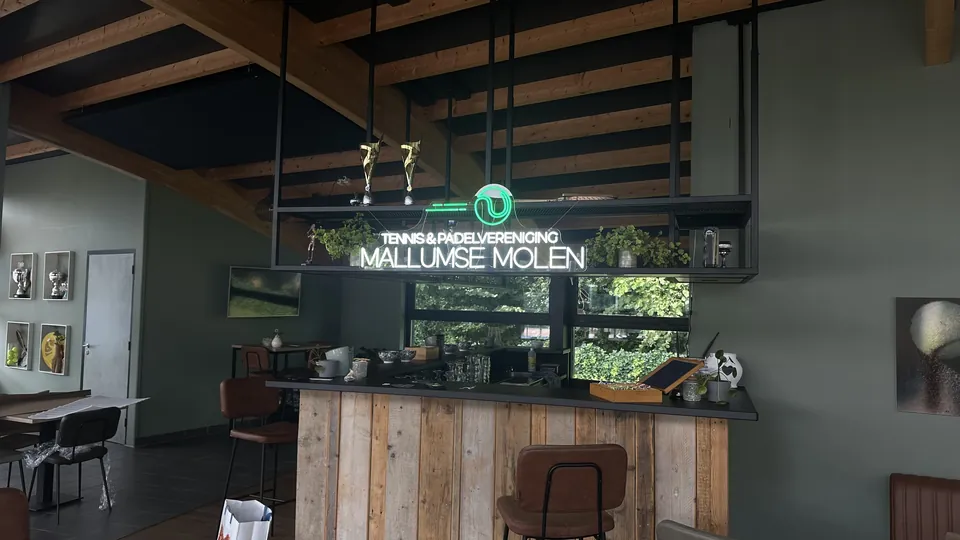
| On a rack or on wires | Down along the rack or wire | Mallumse Molen |
Planning power for a refurbishment or new business
If you are refurbishing or opening a new business, plan the socket in at the same time. An electrician then fits it at the right height straight away, behind or next to the sign, and the cable disappears behind the backing. That is neater than adding a cable duct over a new wall afterwards. A schedule counting back from your opening date is in opening your business; if you work as a designer for a client, read interior designers and stand builders.
How much power does an LED sign use?
An LED sign uses little energy, and the LED tube lasts up to 50,000 hours of use. Exactly how much a sign uses depends on the size and the amount of tube in your design, so we do not give a fixed figure here. If you want to know for your sign, ask when you get your design. Read the difference from classic neon in LED neon or glass neon.
Dimming and switching on or off
With the remote control you switch the sign on and off and choose any brightness in between. During the day or in a bright room you set it bright, in the evening or in a calm room softer. In a bedroom or yoga studio a soft setting is often the most pleasant. If the remote control does not respond, first check whether the battery still works.
RGB: changing colour
If you choose RGB, you change colour with the remote control. Handy if your sign should set a different mood on different occasions, such as in a games room, during group classes or for a promotion in your shop. With a fixed colour, or several fixed colours in a logo, the colour stays the same; for a company logo that is usually the better choice. Read more about colours in LED neon colours.
Low voltage and heat
The sign itself runs on low voltage and the tube stays cool. There is no glass and no gas in it. That means a sign can hang in places where people come close. Read what else a sign is made of in what is LED neon.
Safe use
- Only use the supplied power adapter.
- Hang a standard sign in a dry room; not in the bathroom, by a basin or in a damp room.
- Keep the sign away from heat sources, such as a heater or radiator.
- Only clean the sign when it is off, with a dry or slightly damp cloth.
- Hang the sign and the power adapter out of reach of small children.
By situation
| Situation | What to look for |
|---|---|
| At home above the sofa or bed | Socket nearby; cable in a cable duct; dim it softly |
| Office or reception | Have a socket fitted behind or next to the sign; cable behind the backing |
| Bar or hospitality | Away from steam, water and heat sources |
| Behind the window | Socket by the window; cable along the window frame |
| Hanging freely on wires or a rack | Cable down along the wire or rack |
| Outdoors | The waterproof version; see outdoors |
And outdoors?
A standard sign is for indoors. If the sign goes on the façade, under an awning or on the terrace, choose the waterproof version; in the configurator it costs 17 per cent more. A sign behind the window counts as indoors. Read more in an LED sign behind the window.
Moving the sign
Want to hang the sign somewhere else? First unplug it from the socket. Release the sign from the stand-offs or wires and lift it by the backing, not by the tube or the cable. Pack it well, for example in the original box. In the new spot you hang it the same way.
Controls in a business
In a shop or office, a fixed place for the remote control helps, for example by the till or the front desk. Agree who switches the sign on at opening and off at closing. That way it is on when customers are there, and not all night when no one sees it.
Not working?
- Is the plug properly in the socket, and does that socket work?
- Are the sign's cable, the dimmer and the power adapter properly connected?
- Is the sign not switched off or dimmed to the lowest setting?
- Does the remote control's battery still work?
If that does not help, report it on WhatsApp or by email with a photo or video. You get a 2-year warranty on manufacturing faults and technical defects, and a solution within 14 days. Read what is and is not covered in lifespan and care. Contact details are on the contact page.